
Automate your law firm’s IP filing and monitoring
Collect client information, prepare applications, and reduce repeated entry at filing. Monitor potential infringement and give your attorneys the evidence to advise clients on a response.
Trademarks · Patents · Copyrights
Attorney-controlled review and submission.
Supporting evidence for attorney assessmentIllustrative data
Application preparation, monitoring, and follow-up
Keep the work connected to the client’s matter.
- 01
Prepare & file
From client materials to a reviewed application. Reduce the repeated entry between intake and filing.
- 02
Monitor & investigate
Surface potential conflicts from web sources and new USPTO filings, with the evidence attached.
- 03
Review & act
Prioritize findings, bring concerns to the client, and decide the appropriate response.
Monitor potential infringement after filing
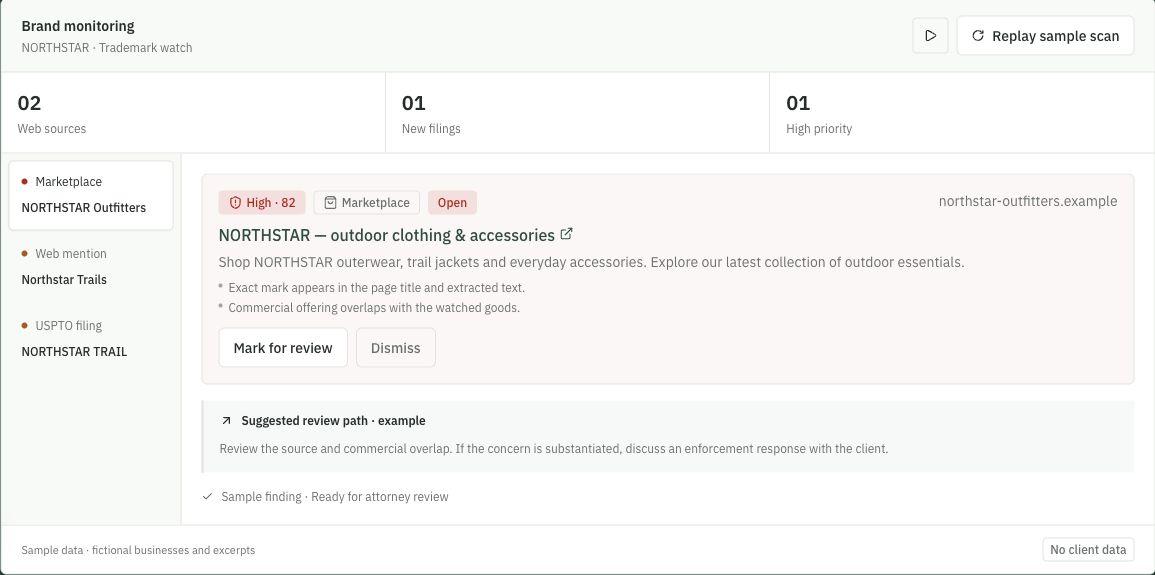
Potential infringement rarely arrives neatly in your inbox. Monitor web sources and new trademark filings, then review matches with source links, extracted text, and a reason for the flag.
Monthly scheduled checks and additional scans when needed. Monitoring coverage depends on the available sources and your plan.
Brand monitoring
NORTHSTAR · Trademark watch
02
Web sources
01
New filings
01
High priority
- High · 82MarketplaceOpennorthstar-outfitters.exampleNORTHSTAR — outdoor clothing & accessories
Shop NORTHSTAR outerwear, trail jackets and everyday accessories. Explore our latest collection of outdoor essentials.
- Exact mark appears in the page title and extracted text.
- Commercial offering overlaps with the watched goods.
Suggested review path · example
Review the source and commercial overlap. If the concern is substantiated, discuss an enforcement response with the client.
Sample finding · Ready for attorney review
Source-backed results
Read the page excerpt and follow the original source.
A prioritized review queue
See why a result was flagged and assess the context.
Review and resolution
Mark for review, dismiss, or resolve as the matter develops.
Automate IP preparation and filing handoff
Collect client materials once. Connect intake, research, drafting, attorney review, and filing handoff in the same matter.
- Structured intake from documents, links, and client conversations
- Application preparation with supporting evidence close at hand
- Attended Trademark Center autofill from approved matter data
Your attorney reviews and completes signature, payment, and submission. Patent and copyright matters use their own preparation and guided handoff processes.
NORTHSTAR
NS-2026-014 · Brightline Retail Co.
Review approved data before filing
Use approved matter data for attended Trademark Center autofill.
- Attorney approval before filing
- Short-lived extension handoff
- Attorney completes signature, payment, and submission
The matter stepper used in InstaGuard IP · sample data · select a step
Review potential conflicts and advise your clients
A watch alert is the beginning of an assessment. Review the evidence, surface a potential conflict to the client, and decide whether to investigate, keep monitoring, or pursue an enforcement response.
Keep that work connected to the wider portfolio—so the next deadline, review, or client follow-up stays in view.
Explore the example findingsSuggested review paths are illustrative. Legal assessment and any enforcement action remain with the firm; messages and demands are not sent automatically.
Portfolio components from the application · fictional client records
Manage your firm’s IP filing and monitoring with InstaGuard IP
Prepare applications, monitor potential conflicts, and manage client follow-up in the same system.